
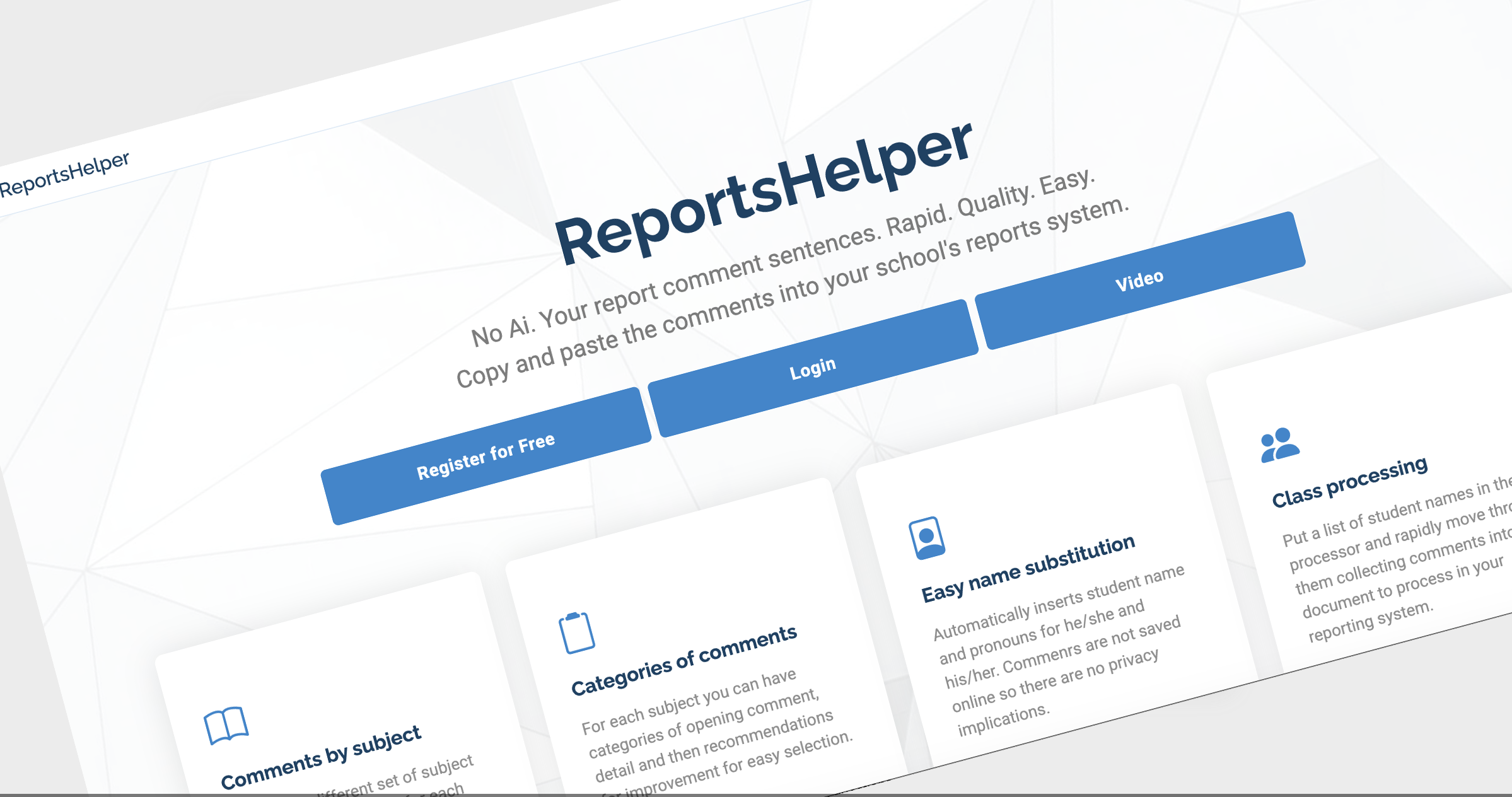
ReportsHelper
Write high-quality student reports in a fraction of the time.
Build, select, and personalise comment sentences with ease — no AI required1.
Simply edit the rapid draft then copy and paste into your school’s reporting system.
Comments by subject
Create and manage tailored report comment sentences for each subject you teach - with easy word selection within sentences to customise comments.
1 No AI is used to generate report comments. Every sentence is written and selected by you. An optional Gemini Gem (AI) is available to help you draft ideas if you choose.
Structured comment categories
Organise report sentences into openings, detailed feedback, and improvement for faster, consistent report writing.
Automatic name & pronouns
Instantly personalise comments with student names and correct pronouns. Nothing is stored online — your data stays private.
Rapidly process entire classes
Paste a class list and move through students quickly, building a complete set of comments ready to paste into your reporting system. Or even better - store a class list for rapid processing next term!
About Us
Built by a teacher, for teachers
Writing student reports is time-consuming, but it’s one of the most important ways we communicate with students and families. Any tool designed to help teachers must:
- Be simple and intuitive to use
- Be fully customisable to subjects and teaching style
- Save meaningful amounts of time
ReportsHelper was created to do exactly that — helping teachers write better reports, faster. Schools can also provide guidance, policies, and examples directly within the platform, ensuring consistency and quality across staff.
Start writing reports faster today
No credit card required. Get started instantly and create up to 50 report sentences for free.
Register for freePricing
Try ReportsHelper risk-free. No credit card required. Upgrade only when you’re ready to unlock unlimited report sentences.
Free Trial
$0 / month
- Unlimited classes
- Unlimited sentence categories
- Create up to 50 report sentences
- School-based guidance
Annual subscription
$49 / year
- Unlimited classes
- Unlimited sentence categories
- Unlimited report sentences
- School-based guidance
School pricing
$Talk to us / year
- Unlimited classes
- Unlimited sentence categories
- Full functionality
- School-based guidance
Frequently Asked Questions
Are the report comments written by AI?
No. All report comments are written, selected, and refined by you. ReportsHelper gives you structured sentence building — not AI-generated output.
If you want help getting started, we provide a Gemini Gem (AI) to generate draft sentence ideas, which you can edit and customise.
Is it easy to use?
Yes — it’s designed to be simple from the start. You’ll get a ready-to-use sentence bank, plus guidance and a walkthrough video.
Can I process a class list?
Yes. Paste in a list of student names and move through them quickly, building a full set of comments in one document ready to paste into your reporting system.
Does this integrate with school reporting systems?
No integration is required. Simply copy and paste your completed comments into your school’s reporting platform.
Do I need a credit card to start?
No — just your email address. You can start immediately and create up to 50 report sentences for free.
Are student comments stored online?
No. Comments are generated in your browser and are not stored in a database, ensuring privacy and peace of mind.
Contact
Upgrade your account
Start your free trial and unlock full access.
Pro Plan
$30/year (after trial)
- ✔ Unlimited report generation
- ✔ All subjects & sentence banks
- ✔ Future premium features
My Sentence Bank
Structure is
[class: English|1]
Means – English term 1
[students: 9A]
Liam Jones /m
Peta Payne /f
[/students]
Means – these are student names for English. You can have multiple classes of students by repeating the same approach. You only need to have the students once and they will automatically be available for each term for the subject.
[Sentence category name]
#name# has demonstrated a sophisticated understanding of textual analysis
Means – several sentences in the category named. Use multiple sentence categories for each subject and term. To end the subject just commence with the header for the next subject and term.
The replaceable markers to use in the sentences are:
#name# = name toggling with he/she where sentence 1 and 4 etc will use the name and the others he/she#name_him/her# = name toggling with him/her rather than he/she #he/she# = he/she #his/her# = his/her #him/herself# = himself/herself //option 1/option 2/option n// = these will be presented as selection options to the user with a choose word button in the drafterd textSkeleton structure example
[class: English 9|1]

[students: 9A]
Liam Carter /m
Olivia Nguyen /f
[/students]

[Opening]
#name# has made a positive start to the year.
#name# is developing confidence in English.

[Textual Analysis]
#he/she# identifies key themes in texts.
#he/she# is developing analytical skills.

[Improvement]
#name# should proofread #his/her# work carefully.
#name# is encouraged to participate more in class.


[class: English 9|2]

[Opening]
#name# has continued to make steady progress.
#name# shows a growing understanding of content.

[Creative Expression]
#he/she# uses descriptive language effectively.
#he/she# is developing creativity in writing.

[Improvement]
#name# should plan writing more carefully.
#name# is encouraged to read more widely.


[class: Geography 9|1]

[students: 9A]
Noah Williams /m
Amelia Singh /f
[/students]

[Opening]
#name# has made a strong start in Geography.
#name# shows interest in the subject.

[Mapping Skills]
#he/she# uses basic map skills.
#he/she# understands simple symbols.

[Improvement]
#name# should improve accuracy in work.
#name# is encouraged to ask questions.


[class: Geography 9|2]

[Opening]
#name# continues to make progress.
#name# shows consistent effort.

[Biomes & Data]
#he/she# understands basic environmental concepts.
#he/she# can interpret simple data.

[Improvement]
#name# should stay focused during tasks.
#name# is encouraged to complete work carefully.
Example Sentence Ideas
High Effort
#name# consistently demonstrates exemplary behaviour and contributes positively to the learning environment, always applying #him/herself# with outstanding effort.#name# is an exceptional role model in class, showing respect and enthusiasm while fully applying #him/herself# to all tasks.
#name# maintains excellent focus and consistently puts forth maximum effort, enhancing the classroom environment for everyone.
#name# demonstrates a highly positive attitude and always applies #him/herself# diligently to learning activities.
#name# contributes thoughtfully and respectfully, showing outstanding commitment to learning.
#name# works with great independence and motivation, always striving to do #his/her# best.
#name# is highly engaged in lessons and consistently contributes to a productive classroom atmosphere.
#name# approaches all tasks with enthusiasm and applies #him/herself# fully.
Good Effort
#name# shows excellent behaviour and consistently demonstrates strong effort in all areas.#name# is a focused and motivated learner who contributes positively at all times.
#name# demonstrates very strong effort and is consistently well-behaved in class.
#name# contributes positively to discussions and shows a strong commitment to learning.
#name# works hard and maintains a positive attitude toward learning.
#name# is attentive and shows very good effort across lessons.
#name# engages well and demonstrates consistent focus and determination.
#name# behaves responsibly and applies #him/herself# well in most tasks.
Secure / Expected
#name# shows very good engagement and contributes positively to the class.#name# is cooperative and works hard to achieve #his/her# potential.
#name# participates actively and maintains a strong work ethic.
#name# shows good independence and consistently applies effort.
#name# demonstrates good behaviour and generally works with focus and determination.
#name# contributes well to class discussions and applies #him/herself# with good effort.
#name# shows a positive attitude and works well during most lessons.
#name# is generally focused and demonstrates good effort.
Developing
#name# participates well and contributes to a supportive learning environment.#name# works steadily and shows a willingness to improve.
#name# behaves appropriately and completes tasks with good effort.
#name# is attentive in class and contributes when encouraged.
#name# shows good engagement and maintains focus for most of the lesson.
#name# demonstrates a solid approach to learning and class participation.
#name# is usually well-behaved and shows a satisfactory level of effort.
#name# contributes appropriately and works with reasonable focus.
Inconsistent
#name# shows inconsistent effort but is capable of more.#name# sometimes contributes but needs to apply #him/herself# more consistently.
#name# demonstrates variable focus during lessons.
#name# can engage well but does not always sustain effort.
#name# needs to contribute more regularly to class activities.
#name# shows some positive behaviours but lacks consistency.
#name# occasionally disrupts focus and needs to improve effort.
#name# demonstrates partial engagement with learning tasks.
Needs Improvement
#name# would benefit from greater commitment to classwork.#name# is capable but does not always apply #him/herself# fully.
#name# needs to improve consistency in both behaviour and effort.
#name# sometimes struggles to remain focused during lessons.
#name# requires reminders to stay on task and engaged.
#name# effort varies and needs to become more consistent.
#name# can be distracted and needs to improve concentration.
#name# does not always contribute positively to the learning environment.
Serious Concern
#name# needs to take greater responsibility for #his/her# learning.#name# sometimes interrupts learning and needs to improve behaviour.
#name# requires encouragement to complete tasks fully.
#name# demonstrates limited engagement in lessons.
#name# often struggles to maintain focus and complete tasks.
#name# shows limited effort and needs to improve engagement.
#name# requires frequent reminders to stay on task.
#name# behaviour can impact #his/her# own learning.
Stretch / Extension
To further excel, #name# could continue refining #his/her# already strong approach by seeking additional challenges.#name# would benefit from extending #his/her# thinking by exploring more advanced ideas in the subject.
To reach even higher standards, #name# should aim to deepen #his/her# analysis in tasks.
#name# could enhance #his/her# excellent work by taking more initiative in independent study.
Further progress could be made if #name# consistently pushes #him/herself# beyond the basics.
#name# should aim to challenge #him/herself# by tackling more complex problems.
To build on strong performance, #name# could contribute even more detailed responses.
#name# would benefit from refining #his/her# answers with greater precision.
Strong Next Steps
#name# could further improve by consistently applying advanced skills in all tasks.Continued success will come as #name# develops even greater independence in learning.
#name# could improve by checking work carefully to avoid minor errors.
#name# would benefit from developing greater consistency in high-quality work.
To progress further, #name# should aim to expand #his/her# explanations.
#name# could strengthen performance by contributing more frequently in lessons.
#name# would benefit from asking questions to deepen understanding.
To improve further, #name# should aim to maintain focus throughout all tasks.
Secure / Expected
#name# could enhance learning by reviewing work more thoroughly.#name# should aim to apply feedback more consistently.
#name# would benefit from taking more care in presenting work.
#name# could improve by ensuring all tasks are completed to a high standard.
#name# should aim to participate more actively in class discussions.
#name# would benefit from developing greater confidence when contributing ideas.
To improve, #name# should focus on completing all work within the given time.
#name# could strengthen understanding by revisiting key concepts regularly.
Developing
#name# should aim to stay focused during the entirety of each lesson.#name# would benefit from putting more consistent effort into homework tasks.
#name# could improve by listening carefully to instructions.
#name# should aim to build on existing knowledge through regular revision.
#name# would benefit from organising work more effectively.
#name# could improve by taking more responsibility for #his/her# progress.
#name# should aim to contribute more regularly during lessons.
#name# would benefit from increased focus during independent work.
Inconsistent
To improve, #name# should ensure tasks are completed fully.#name# could strengthen performance by practising key skills more frequently.
#name# should aim to remain engaged throughout activities.
#name# would benefit from checking understanding before moving on.
#name# could improve by following instructions more carefully.
#name# should aim to manage time more effectively during tasks.
#name# would benefit from improving organisation of materials.
#name# could improve by showing greater attention to detail.
Needs Improvement
#name# needs to apply #him/herself# more consistently in lessons.#name# would benefit from putting in more sustained effort.
#name# should aim to improve concentration during classwork.
#name# could improve by completing all assigned tasks.
#name# needs to take greater care with the quality of work produced.
#name# would benefit from participating more in class activities.
#name# should aim to develop a more positive approach to learning.
#name# could improve by seeking help when unsure.
Serious Concern
#name# needs to focus more during teacher explanations.#name# would benefit from practising skills outside of lessons.
#name# needs to improve consistency in effort across all tasks.
#name# should aim to stay on task without reminders.
#name# would benefit from engaging more actively with learning.
#name# needs to take more responsibility for completing work.
#name# should aim to reduce distractions during lessons.
#name# could improve by listening and responding appropriately.
Excellent
#name# is a wonderful learner who always tries #his/her# best and enjoys all learning activities.#name# shows a fantastic attitude to learning and works very hard in class.
#name# is a positive role model who always follows classroom expectations.
#name# loves learning and always gives tasks #his/her# best effort.
#name# is a confident learner who enjoys sharing ideas with the class.
#name# works independently and shows great pride in #his/her# work.
#name# listens carefully and always tries to do #his/her# best.
#name# is a kind and respectful student who contributes positively to the class.
Strong
#name# shows excellent focus and completes all tasks with care.#name# is enthusiastic and always ready to learn new things.
#name# is a happy learner who works well in all activities.
#name# shows a positive attitude and works hard to complete tasks.
#name# listens well and follows instructions carefully.
#name# is eager to learn and enjoys participating in lessons.
#name# works well with others and shares ideas respectfully.
#name# is developing confidence when sharing #his/her# thinking.
Expected
#name# tries hard and is making great progress.#name# is a cooperative student who enjoys learning.
#name# shows good focus during most lessons.
#name# completes work with care and attention.
#name# is a capable learner who is building confidence.
#name# participates well in class discussions.
#name# is learning to work more independently.
#name# shows good effort in most tasks.
Developing
#name# listens well and follows routines.#name# is making steady progress in #his/her# learning.
#name# works well when supported.
#name# is beginning to share ideas more often.
#name# shows a positive attitude to learning.
#name# is developing good learning habits.
#name# is learning to stay focused during activities.
#name# participates when encouraged.
Emerging
#name# is working towards completing tasks independently.#name# shows growing confidence in class.
#name# is beginning to follow instructions more consistently.
#name# works well in small group activities.
#name# is developing persistence when tasks are challenging.
#name# shows effort and is improving.
#name# is learning to take pride in #his/her# work.
#name# is building skills across learning areas.
Needs Support
#name# is working towards staying on task for longer periods.#name# sometimes needs reminders to stay focused.
#name# is developing confidence when trying new tasks.
#name# is learning to listen carefully to instructions.
#name# is beginning to complete tasks with support.
#name# is encouraged to share ideas more often.
#name# is learning to work more independently.
#name# is building confidence in the classroom.
Requires Ongoing Support
#name# benefits from encouragement to stay engaged.#name# is working towards improving #his/her# focus.
#name# needs reminders to stay on task.
#name# is learning to follow classroom routines.
#name# is encouraged to try #his/her# best in all tasks.
#name# is working on listening carefully during lessons.
#name# needs support to complete tasks.
#name# is learning to participate more in class activities.
Excellent
#name# is a highly motivated learner who consistently produces excellent work.#name# demonstrates a strong commitment to learning and always tries #his/her# best.
#name# is a confident and capable student who contributes thoughtfully in class.
#name# shows excellent focus and takes pride in all work completed.
#name# is an enthusiastic learner who approaches all tasks with confidence.
#name# works independently and consistently achieves high-quality results.
#name# listens carefully and applies new skills effectively.
#name# is a positive role model who always follows classroom expectations.
Strong
#name# shows initiative and actively contributes to class discussions.#name# approaches learning with a positive attitude and strong effort.
#name# demonstrates very good effort and works well across all learning areas.
#name# is a focused learner who completes tasks to a high standard.
#name# participates confidently and shares ideas clearly.
#name# shows strong organisational skills and works independently.
#name# listens carefully and applies feedback effectively.
#name# is developing strong problem-solving skills.
Expected
#name# works well with others and contributes positively to group work.#name# shows persistence when faced with challenges.
#name# is building confidence in all areas of learning.
#name# completes tasks with care and attention to detail.
#name# demonstrates good effort and a positive attitude to learning.
#name# is a capable student who is making steady progress.
#name# participates well and contributes to class discussions.
#name# shows good understanding of key concepts.
Developing
#name# works well both independently and in groups.#name# is developing confidence when sharing ideas.
#name# completes most tasks with care.
#name# shows good focus during lessons.
#name# is building independence in #his/her# learning.
#name# demonstrates a positive approach to tasks.
#name# is making steady progress and shows consistent effort.
#name# participates when encouraged and is developing confidence.
Emerging
#name# shows understanding but would benefit from more consistent effort.#name# is working towards completing tasks independently.
#name# is developing good learning habits.
#name# contributes to discussions with support.
#name# is building skills across all learning areas.
#name# works well when focused.
#name# is learning to organise #his/her# work more effectively.
#name# demonstrates a willingness to learn.
Needs Support
#name# is working towards maintaining focus during lessons.#name# sometimes needs reminders to stay on task.
#name# is developing confidence in class participation.
#name# is learning to apply skills more independently.
#name# would benefit from checking work more carefully.
#name# is beginning to complete tasks with less support.
#name# is encouraged to contribute more regularly.
#name# is working towards improving organisation skills.
Requires Ongoing Support
#name# is developing persistence with challenging tasks.#name# benefits from guidance to stay engaged.
#name# needs to apply #him/herself# more consistently.
#name# is encouraged to stay focused during lessons.
#name# would benefit from increased participation in class discussions.
#name# needs reminders to complete tasks.
#name# is learning to follow instructions more carefully.
#name# needs support to maintain focus.
Excellent
#name# is a highly capable and motivated learner who consistently produces work of an excellent standard.#name# demonstrates outstanding effort and a strong commitment to all areas of learning.
#name# is a confident learner who contributes insightful ideas to class discussions.
#name# shows excellent independence and takes responsibility for #his/her# learning.
#name# consistently applies #him/herself# with focus and determination.
#name# approaches all tasks with enthusiasm and a positive attitude.
#name# is an organised student who produces high-quality work.
#name# demonstrates strong problem-solving skills and perseverance.
Strong
#name# is a thoughtful contributor who enhances class discussions.#name# sets a positive example through #his/her# behaviour and work ethic.
#name# demonstrates very good effort and works consistently across all subjects.
#name# is a focused learner who completes work to a high standard.
#name# contributes confidently and listens respectfully to others.
#name# shows good independence and takes pride in #his/her# work.
#name# responds well to feedback and applies it effectively.
#name# demonstrates persistence when faced with challenges.
Expected
#name# works well collaboratively and contributes positively to group tasks.#name# shows strong engagement in class activities.
#name# is developing confidence in sharing ideas.
#name# manages time effectively to complete tasks.
#name# demonstrates good effort and a positive approach to learning.
#name# is a capable learner who is making steady progress.
#name# participates regularly in class discussions.
#name# shows a sound understanding of concepts taught.
Developing
#name# works well both independently and with others.#name# is developing greater independence in learning tasks.
#name# completes most work to a satisfactory standard.
#name# shows good focus during most lessons.
#name# is building confidence across learning areas.
#name# demonstrates a willingness to improve.
#name# is making steady progress and generally applies #him/herself# well.
#name# participates when encouraged and is building confidence.
Emerging
#name# shows understanding but could apply more consistent effort.#name# is working towards completing tasks independently.
#name# is developing organisation skills.
#name# contributes to discussions with support.
#name# is building skills across all subjects.
#name# works well when focused on tasks.
#name# is learning to manage time more effectively.
#name# demonstrates a positive attitude to learning.
Needs Support
#name# is working towards maintaining focus during lessons.#name# sometimes needs reminders to stay on task.
#name# is developing confidence in class participation.
#name# is learning to apply skills more independently.
#name# would benefit from checking work more carefully.
#name# is beginning to complete tasks with less support.
#name# is encouraged to contribute more regularly.
#name# is working towards improving organisation.
Requires Ongoing Support
#name# is developing persistence with challenging work.#name# benefits from guidance to stay engaged.
#name# needs to apply #him/herself# more consistently to tasks.
#name# is encouraged to stay focused throughout lessons.
#name# would benefit from increased participation in discussions.
#name# needs reminders to complete work on time.
#name# is learning to follow instructions more carefully.
#name# needs support to maintain concentration.
Excellent
#name# is a highly capable learner who consistently produces work of an excellent standard.#name# demonstrates outstanding effort and a strong commitment to all learning tasks.
#name# is a confident student who contributes thoughtful ideas during discussions.
#name# shows excellent independence and takes responsibility for #his/her# learning.
#name# consistently applies #him/herself# with focus and determination.
#name# approaches all tasks with enthusiasm and a positive attitude.
#name# is well organised and produces high-quality work.
#name# demonstrates strong problem-solving skills and perseverance.
Strong
#name# is a respectful and engaged member of the class.#name# takes pride in #his/her# work and strives for success.
#name# demonstrates very good effort and works consistently across all subjects.
#name# is a focused learner who completes work to a high standard.
#name# contributes confidently and listens respectfully to others.
#name# shows good independence and takes pride in #his/her# work.
#name# responds well to feedback and applies it effectively.
#name# demonstrates persistence when tasks are challenging.
Expected
#name# works well collaboratively and contributes positively to group work.#name# shows strong engagement in class activities.
#name# is developing confidence in sharing ideas.
#name# manages time well to complete tasks.
#name# demonstrates good effort and a positive approach to learning.
#name# is a capable student who is making steady progress.
#name# participates regularly in class discussions.
#name# shows a sound understanding of concepts taught.
Developing
#name# works well both independently and with others.#name# is developing greater independence in learning tasks.
#name# completes most work to a satisfactory standard.
#name# shows good focus during most lessons.
#name# is building confidence across learning areas.
#name# demonstrates a willingness to improve.
#name# is making steady progress and generally applies #him/herself# well.
#name# participates when encouraged and is building confidence.
Emerging
#name# shows understanding but could apply more consistent effort.#name# is working towards completing tasks independently.
#name# is developing organisational skills.
#name# contributes to discussions with support.
#name# is building skills across all subject areas.
#name# works well when focused on tasks.
#name# is learning to manage time more effectively.
#name# demonstrates a positive attitude toward learning.
Needs Support
#name# is working towards maintaining focus during lessons.#name# sometimes needs reminders to stay on task.
#name# is developing confidence in class participation.
#name# is learning to apply skills more independently.
#name# would benefit from checking work more carefully.
#name# is beginning to complete tasks with less support.
#name# is encouraged to contribute more regularly.
#name# is working towards improving organisation.
Requires Ongoing Support
#name# is developing persistence with challenging work.#name# benefits from guidance to stay engaged.
#name# needs to apply #him/herself# more consistently to tasks.
#name# is encouraged to stay focused throughout lessons.
#name# would benefit from increased participation in discussions.
#name# needs reminders to complete work on time.
#name# is learning to follow instructions more carefully.
#name# needs support to maintain concentration.
Excellent
#name# is a highly motivated and independent learner who consistently produces work of an excellent standard.#name# demonstrates outstanding commitment and takes full responsibility for #his/her# learning.
#name# is a confident and articulate student who contributes insightful ideas to discussions.
#name# consistently applies #him/herself# with focus, determination, and initiative.
#name# demonstrates excellent organisational skills and produces high-quality work.
#name# is an engaged learner who approaches challenges with confidence.
#name# shows strong critical thinking skills and applies knowledge effectively.
#name# is a positive role model who contributes meaningfully to the class.
Strong
#name# demonstrates persistence and resilience in all learning tasks.#name# consistently reflects on feedback and uses it to improve performance.
#name# demonstrates very strong effort and works consistently across all subjects.
#name# is a focused learner who produces work to a high standard.
#name# contributes thoughtfully and listens respectfully to others.
#name# shows good independence and takes pride in #his/her# work.
#name# responds well to feedback and applies it effectively.
#name# demonstrates persistence when tasks are challenging.
Expected
#name# works collaboratively and contributes positively to group work.#name# shows strong engagement in all learning activities.
#name# is developing confidence in expressing ideas clearly.
#name# manages time effectively to complete tasks on schedule.
#name# demonstrates good effort and a positive approach to learning.
#name# is a capable student who is making steady progress.
#name# participates regularly in class discussions.
#name# shows a sound understanding of concepts taught.
Developing
#name# works well both independently and with others.#name# is developing greater independence in learning tasks.
#name# completes most work to a satisfactory standard.
#name# shows good focus during most lessons.
#name# is building confidence across learning areas.
#name# demonstrates a willingness to improve.
#name# is making steady progress and generally applies #him/herself# well.
#name# participates when encouraged and is building confidence.
Emerging
#name# shows understanding but could apply more consistent effort.#name# is working towards completing tasks independently.
#name# is developing organisational and study skills.
#name# contributes to discussions with support.
#name# is building skills across all subjects.
#name# works well when focused on tasks.
#name# is learning to manage time more effectively.
#name# demonstrates a positive attitude toward learning.
Needs Support
#name# is working towards maintaining focus during lessons.#name# sometimes needs reminders to stay on task.
#name# is developing confidence in class participation.
#name# is learning to apply skills more independently.
#name# would benefit from checking work more carefully.
#name# is beginning to complete tasks with less support.
#name# is encouraged to contribute more regularly.
#name# is working towards improving organisation.
Requires Ongoing Support
#name# is developing persistence with challenging work.#name# benefits from guidance to stay engaged.
#name# needs to apply #him/herself# more consistently to tasks.
#name# is encouraged to stay focused throughout lessons.
#name# would benefit from increased participation in discussions.
#name# needs reminders to complete work on time.
#name# is learning to follow instructions more carefully.
#name# needs support to maintain concentration.
Excellent
#name# is a highly independent and motivated learner who consistently produces work of an excellent standard.#name# demonstrates outstanding commitment to learning and takes full responsibility for #his/her# progress.
#name# is a confident and articulate student who contributes insightful and well-considered ideas.
#name# consistently applies #him/herself# with focus, determination, and initiative.
#name# demonstrates excellent organisational skills and manages time effectively.
#name# approaches challenges with confidence and resilience.
#name# shows strong critical thinking skills and applies knowledge across contexts.
#name# is a positive role model who contributes meaningfully to the learning environment.
Strong
#name# demonstrates persistence and a strong work ethic in all tasks.#name# reflects thoughtfully on feedback and uses it to improve learning outcomes.
#name# demonstrates very strong effort and works consistently across all subject areas.
#name# is a focused learner who produces work to a high standard.
#name# contributes thoughtfully and listens respectfully to others’ perspectives.
#name# shows good independence and takes pride in #his/her# work.
#name# responds well to feedback and applies it effectively.
#name# demonstrates persistence when faced with challenging tasks.
Expected
#name# works collaboratively and contributes positively to group activities.#name# shows strong engagement in all learning experiences.
#name# is developing confidence in expressing ideas clearly and effectively.
#name# manages time well to complete tasks within set deadlines.
#name# demonstrates good effort and a positive approach to learning.
#name# is a capable student who is making steady progress.
#name# participates regularly in class discussions.
#name# shows a sound understanding of key concepts.
Developing
#name# works effectively both independently and collaboratively.#name# is developing greater independence in managing learning tasks.
#name# completes most work to a satisfactory standard.
#name# maintains focus during most lessons.
#name# is building confidence across subject areas.
#name# demonstrates a willingness to improve.
#name# is making steady progress and generally applies #him/herself# well.
#name# participates when encouraged and is building confidence.
Emerging
#name# shows understanding but could apply more consistent effort.#name# is working towards completing tasks independently.
#name# is developing organisational and study skills.
#name# contributes to discussions with support.
#name# is building skills across all subject areas.
#name# works well when focused on tasks.
#name# is learning to manage time more effectively.
#name# demonstrates a positive attitude toward learning.
Needs Support
#name# is working towards maintaining focus during lessons.#name# sometimes needs reminders to stay on task.
#name# is developing confidence in class participation.
#name# is learning to apply skills more independently.
#name# would benefit from checking work more carefully.
#name# is beginning to complete tasks with less support.
#name# is encouraged to contribute more regularly.
#name# is working towards improving organisation.
Requires Ongoing Support
#name# is developing persistence with challenging work.#name# benefits from guidance to stay engaged.
#name# needs to apply #him/herself# more consistently to tasks.
#name# is encouraged to stay focused throughout lessons.
#name# would benefit from increased participation in discussions.
#name# needs reminders to complete work on time.
#name# is learning to follow instructions more carefully.
#name# needs support to maintain concentration.
Help
ReportsHelper is designed to help you quickly generate consistent, high-quality report comments and optionally build a full class report document in one workflow.
It works based on a bank of report comment sentences which you establish per term for each of your classes which have replaceable variables for student names and appropriate pronouns (your sentence bank). You can save the list of students for each subject in your sentence bank so that report writing for each term becomes much, much faster. Of course, you can always edit to finalise your report comment before pasting into your school's reports system.
Contents
- Overview
- Replacing student names and pronouns
- Sentence Bank Structure
- Using options in a sentence
- Building a Comment
- Using Student Lists
- Building a Full Document
- Trial Limits & Upgrading
- Account & Subscription
- Keyboard Shortcuts
Overview
The application works in two main ways:
- Single comment mode — build and copy one comment at a time
- Batch mode — process a list of students and build multiple comments quickly
In both modes, you select sentences from your sentence bank to construct a polished comment including student name and pronoun insertions.
Replacing student names and pronouns
A number of placeholders have been created which are like variables you put in your sentences as placeholders that automatically adapt to the student’s name and pronoun. The placeholders, which you put in the text of your sentences in your sentence bank, are:
-
#name#→ student name -
#he/she#→ he / she -
#his/her#→ his / her -
#him/herself#→ himself / herself
Example: #name# demonstrates strong effort and applies #him/herself# well in class.
Sentence Bank Structure
The sentence bank is organised into terms, classes, categories, and optional student lists. It is just plain text that you create and edit at the Sentence Bank tab. The structure to signal your subjects and comments etc is as follows:
[class: History 9|2]

[students: 9B]
John Smith /m
Sally Jones /f
[/students]

[Effort]
#name# works consistently in class.

[Behaviour]
#name# contributes positively to discussions.
Things to note:
- the class is signalled with its name and term. Where you teach the same subject at different year levels you may want to indicate the year levek in the class title as in the example for Year 9 Hstory
- optionally students are signalled with a class reference, like 9B. The students here will then be available for all terms for History 9
- each category of sentences has a structured heading (like Effort) and tne sentences using the appropriate variables are then below the category name each on their own lines. Use the categories in sequential order for how you address content in your report comments - typically there is an opening, some content or skill areas, and then an areas for improvement or final comment. You will see this approach in the default sentences supplied, At the sentence bank tab there is also a link for a Gemini Gem (AI) which will output structured text suitable for your sentence bank with some example sentences for subjects you nominate which may assist you as a base to edit from. There is also a Gemini Gem that will take full textual comments you have previously used for students and will extract out the sentences and insert the variables and provide some categories of your sentences for you to get your started.
- one can then have another term for History 9 in the same way for another term, and other subjects
When you first register a default set of subjects and classes are created for you in the correct structure so you can easily pattern match and get started.
Each class must include at least one category of sentences.
Using options in a sentence
Sometimes you may want to have optional adjectives of phrases in use to dynamically select from when drafting a sentence for a student's report. In your sentence bank at the point in the sentence where the alternatives are to be inserted use the following structure:
//option 1/option 2/option 3//
This enables you to have as many options as you want, and just ensure that you open and close your option list with //. Note that an option can be one or more words as well, which enables phrases and dealing with a versus an when the word to be selected may start with a vowel or a consonant.
Building a Comment for a Student
- Select a subject and term
- Enter a name (e.g.
john/m) or load a stored student class from your sentence bank or use a pasted class list - Select sentences to add into the drat report comment using the student name and pronoun (click or press 1–9 etc)
- Use ← → to change categories of sentences (you can also click the category names)
- Finalise any edits to the draft comment and then either cut and paste directly into the school's reports system or click Add to document or press Enter which will build a document at the bottom of the page with the comments for all students in the class
Using Student Lists
Manual list
- Click Paste class list
- Paste names
- Close panel
- First student loads automatically
Stored class lists
- Defined in your sentence bank
- Appear as buttons per class which you click to load the names and commence
- Show count of students
- Load instantly
Processing behaviour
- Copy / Add → saves comment
- Moves to next student
- Clears comment
- Resets category
At the end of a list:
- Processing stops automatically
- Completion message is shown
- Document scrolls into view
Building a Full Document
- Add to document → appends comment with name
- Copy full document → copies everything
- Clear → resets document
Names are formatted automatically and included when using student lists.
Trial Limits & Upgrading
Your free account includes 50 report sentences.
- Counter shows usage
- Warnings appear near limit
- Limit prevents further sentence additions
Upgrade process
- Click Upgrade
- Confirm upgrade
- Complete secure Stripe checkout for an annual payment
- Unlimited access unlocked immediately
Account & Subscription
- View email and role
- Subscription status
- Renewal date
- Manage billing
- Change password
Keyboard Shortcuts
- 1–9 → add sentence
- ← → → change category
- Enter → add to document
- C → copy
- X → clear
- A → add to document
Writing report comment guidance
Writing High-Quality Comments
Report comments are one of the most powerful tools teachers have to communicate student progress to parents, carers, and the students themselves. Well-written comments can motivate, clarify next steps, and build a strong partnership between school and home. Poorly written comments, however, can confuse, discourage, or fail to provide meaningful insight. This guide outlines best practices for writing effective report comments, along with clear examples of strong and weak approaches.
1. Be Clear and Specific
Effective report comments avoid vague language. Instead of general statements, they provide specific information about what a student can do and where they need to improve.
Good example:
James can confidently add and subtract numbers up to 100 and is beginning to apply these skills when solving word problems.
Bad example:
James is doing well in maths.
2. Balance Strengths and Areas for Improvement
Strong comments acknowledge achievement while also identifying clear next steps. This creates a balanced and constructive tone.
Good example:
Amira writes with creativity and uses a wide range of vocabulary. She would benefit from focusing on punctuation, particularly using full stops and capital letters consistently.
Bad example:
Amira struggles with punctuation.
3. Use Professional and Objective Language
Comments should be professional, neutral, and based on observable behaviour or outcomes.
Good example:
Liam participates actively in class discussions and listens carefully to others' ideas.
Bad example:
Liam is a lovely boy who tries his best.
4. Focus on Progress, Not Just Attainment
Parents value understanding how their child is progressing over time.
Good example:
Since the start of the term, Sophie has improved her reading fluency and is now more confident when reading aloud.
Bad example:
Sophie is an average reader.
5. Provide Actionable Next Steps
Effective comments guide future learning by suggesting specific actions.
Good example:
To continue improving, Ethan should practise recalling multiplication facts regularly at home.
Bad example:
Ethan needs to work harder.
6. Avoid Overly Generic Phrases
Generic comments reduce impact.
Bad example:
Working well. Keep it up.
Better example:
Ella completes her work independently and takes care to present her writing neatly.
7. Tailor Comments to the Individual
Each comment should reflect the unique strengths and needs of the student.
Good example:
Noah shows strong problem-solving skills and enjoys tackling challenging tasks, particularly in science investigations.
8. Maintain a Positive Tone
Even when addressing challenges, the tone should remain supportive.
Good example:
Olivia is beginning to stay focused for longer periods and will continue to benefit from encouragement to complete tasks independently.
Bad example:
Olivia is easily distracted and rarely finishes her work.
9. Write for the Audience
Avoid jargon and overly technical language.
Good example:
Daniel can explain his thinking when solving problems and is becoming more confident using mathematical language.
Bad example:
Daniel demonstrates emerging metacognitive strategies in mathematical reasoning.
10. Keep It Concise but Meaningful
Comments should be concise but informative.
Good example:
Grace reads with expression and understands the main ideas in texts.
Bad example:
Grace is a student who reads books and understands what she reads when she is reading.
11. Structure Your Comments
A useful structure is strengths, progress, and next steps.
Example:
Henry approaches his work with enthusiasm and contributes thoughtful ideas during lessons. He has made good progress in developing his writing skills this term. To improve further, he should focus on organising his ideas into clear paragraphs.
12. Be Honest but Kind
Honesty should always be delivered with care.
Good example:
Mia is beginning to engage more with her learning and will benefit from continued support to build her confidence.
13. Highlight Effort and Attitude
Effort and attitude are key indicators of success.
Good example:
Leo consistently shows a positive attitude towards learning and is willing to take on new challenges.
14. Avoid Comparisons
Focus on the individual student.
Bad example:
Emma is one of the best readers in the class.
Better example:
Emma reads fluently and demonstrates a strong understanding of a wide range of texts.
15. Proofread Carefully
Always check spelling, grammar, and clarity before submitting comments.
Example Full Student Report Comments
Oliver
Oliver has had a positive term and approaches his learning with enthusiasm. He contributes regularly during class discussions and shows a good understanding of key concepts, particularly in mathematics. Oliver has made steady progress in his writing and is beginning to organise his ideas more clearly. To continue improving, he should focus on checking his work for spelling and punctuation errors. Overall, Oliver is a motivated learner who responds well to feedback.
Sophia
Sophia is a conscientious student who takes pride in her work. She reads fluently and demonstrates a strong understanding of texts. In writing, she uses a wide range of vocabulary and is developing greater confidence in structuring her ideas. Sophia would benefit from taking more risks in her learning and contributing more frequently during class discussions. She has made good progress this term and continues to be a pleasure to teach.
Ethan
Ethan has shown good progress in mathematics this term and can confidently apply his knowledge to problem-solving tasks. He works well independently and demonstrates resilience when faced with challenges. In English, Ethan is developing his writing skills and is beginning to use more varied sentence structures. To improve further, he should focus on expanding his ideas in greater detail. Ethan has a positive attitude and is making steady progress.
Ava
Ava is a creative and thoughtful student who produces imaginative pieces of writing. She engages well in lessons and listens carefully to others' ideas. Ava has made noticeable progress in reading and is becoming more confident when discussing texts. To continue developing, she should focus on improving the accuracy of her spelling and punctuation. Ava’s enthusiasm for learning is commendable, and she continues to grow in confidence.
Noah
Noah has had a successful term and demonstrates a strong understanding across most subjects. He particularly enjoys science and shows excellent problem-solving skills during investigations. Noah works collaboratively with others and contributes positively to group tasks. To further improve, he should aim to present his work more neatly and take greater care with detail. Noah is a capable student who consistently strives to do his best.
Key Resources
My Account
Account Details
Email:
Role: User
Subscription
Status: free
Paid until: N/A
Change Password
Build report comments
Paste student list
Consider adding the list of students in your Sentence Bank so they will be available next time.
Select report sentences for student report
- ← → switch sentence category
- 1–9 / q–y add sentence
- Enter: add comment to document
- C copy to clipboard and advance to next student
- X clear comment
- V scroll screen down to sentence selection but see students in class progress
Live report comment to edit and finalise
Click the student name to toggle between name and pronoun. The first and every third sentence will use the student name by default.
Collection document of class report comments (where you have used Enter or copied to document)
Using the Student List
The Student list to process feature allows you to quickly generate report comments for an entire class.
How to use it
- Click Student list to process
- Paste student names (one per line). You can use just Christian names or Christian and Surnmes. The surname will then appear in the document being built with all the comments
- Close the panel
- The first student will be selected automatically
- To change the gender have /f or /m at the end of the name, like Sally /f then John /m
What happens next
-
Copy or Add to document below will:
- Save the current comment
- Move to the next student
- Clear the comment box
Tip
This is the fastest way to process a full class without manually changing names.